 PersonaChat
Guide · Saving your data
How to Export and Save Your Character AI Chats and Characters
Character AI has a built-in data export. It covers your whole account in one request, it can take weeks, and it isn't made for loading into another app. Here's how to request it, what to copy by hand, and what you can't bring across.
Last checked: 2 November 2026. Export steps from Character AI's help center. App details match PersonaChat 2.4.1. PersonaChat has no connection to Character AI.
Request your export from Character AI
Export Data only asks for a copy of your account data. It doesn't change or delete anything.
On the web
- Go to your Profile and click Profile Settings.
- Click Account, then Manage Account & Data.
- Click Export Data. A pop-up confirms that a download link will be emailed to you.
In the iPhone or Android app
- Open your Profile and tap the Settings icon.
- Tap Legal & Privacy, then Export Data. An older help page calls this Export my data. A "Success" banner confirms the request.
Character AI says exports can take 3 to 4 weeks. The link goes to the email address on your account and works for 7 days from when it's sent, so make sure you can still get into that inbox, and check spam. At that speed, a request made on 2 November comes back between about 23 and 30 November, around when the sale is expected to finish. Third-party guides report faster turnarounds, but plan on Character AI's figure.
What's in the export
Character AI's help page doesn't list the contents and we haven't inspected an export ourselves, so this part is second-hand. Third-party guides describe a ZIP of JSON files covering your account, your messages and the characters you made. One names the files as user.json, character.json and message.json, and another says the layout has changed over time. One says the ZIP is password-protected with your account's email address. JSON is data meant for software, so you can open it but it won't read like a chat transcript.
The same guides warn about a few gaps:
- Whether a character's full Definition is included. Reports differ.
- Pinned messages, which one guide says don't reliably appear.
- Long chats, which one guide says can come back without the oldest messages. Another says some exports don't show who wrote each line.
- Characters made by other people. Your chats with them are reported to come through without their definitions.
Open the file as soon as it arrives and check that your most important story is there, while you can still ask for another one.
Character AI export not working?
- It has been under 4 weeks. That's within Character AI's own estimate.
- It went to another inbox. The link goes to the email on your account. If you signed in with Google, check that Gmail. If you signed in with Apple and chose Hide My Email, it should reach your Apple ID email through Apple's relay.
- It's in spam or promotions. Search every folder for "character.ai" and "export".
- The link expired. Links last 7 days. Request the export again with the same steps and download the file the day it arrives.
- Still nothing. Submit a request to Character AI's help center. Its Privacy Policy also lists privacy@character.ai for people using their data rights.
Copy what matters by hand
You can do this today without waiting for the export, and it takes a few minutes per character. Paste everything into Notes or a document of your own:
- Each character's name, tagline, description, greeting, and Definition if you can see it
- Your persona text
- Pinned messages and Lorebook entries you care about
- A recap of any story you want to continue: who's who, what has happened, what's unresolved
- Any chat you can't lose. Copy and paste the messages, because Character AI's help pages describe no way to export one chat
Can you export Character AI characters or bots?
Not one at a time through Character AI. Its help pages describe one export for the whole account, with no separate option for a character or bot. Third-party guides say the export covers the characters you made, but reports differ on whether the full Definition comes through, so copy your favorites by hand as well.
Creators can keep a character's Definition private. You'll still see the name, greeting and descriptions, and you can rebuild the rest from how the character talks in your chats.
The tool most guides name is CAI Tools, an unofficial browser extension. Its documentation says it can download a single chat, your chat history, or a character as a card or JSON file, though not a Definition the creator has kept private. It isn't made by Character AI or by us, and we haven't tested it. It runs inside your signed-in session, so read its permissions before you install it.
What can and can't move to PersonaChat
What can't come across
- Chat history. PersonaChat has no chat import and can't read Character AI's export file. Keep the export as your archive and continue from your recap.
- Voices and calls. PersonaChat is text-first and has no voice calls.
- Your c.ai+ plan. Subscriptions don't carry over. In PersonaChat, memory, every model and message editing are free, and Premium removes ads and daily limits.
- Followers, likes and your public profile. PersonaChat has no public character feed.
What you can bring across by hand
- Characters you made. Rebuild them in the Workshop by pasting in what you saved.
- Other people's characters. Rebuild from what you can see. If the creator has also posted a JSON card somewhere like Chub, import that.
- Your persona. Recreate it in the Personas tab. If you add a description, write {{user}} in place of your name, as the app requires it.
- Pinned messages and Lorebook entries. Add the facts as Lorebook entries, up to 512 characters each.
- Character images. If you've saved the picture, set it as the avatar or chat wallpaper.
Some other apps advertise importing Character AI exports. If getting your old chats into the new app matters most to you, check those before choosing. PersonaChat is also iPhone and iPad only.
Rebuild a character in PersonaChat
- Open the Workshop tab and tap New. The form needs a first name of at least two characters, one tag, a creator name and a Card Description, which is shown to you and not sent to the AI.
- Paste the Definition or your notes into Personality. Include a few sample lines so the character picks up the voice.
- Put the backstory and your recap in Scenario. The AI reads this field and you don't see it in the chat, so spoilers are fine.
- Add the greeting as a Story Starter, or write an opening that picks up where your story stopped. Each one needs a short Story Summary, which is also shown only to you.
- Save, then add the facts that must stick. Open Memory & Lore from the character's start or continue screen and tap Add Lore. Use one or two clear sentences per fact, and choose whether it applies to this story or to all chats with that character.
- Chat for a few minutes and adjust. The character won't sound identical, because the AI models are different. Sharpen the Personality field, or try another built-in model.
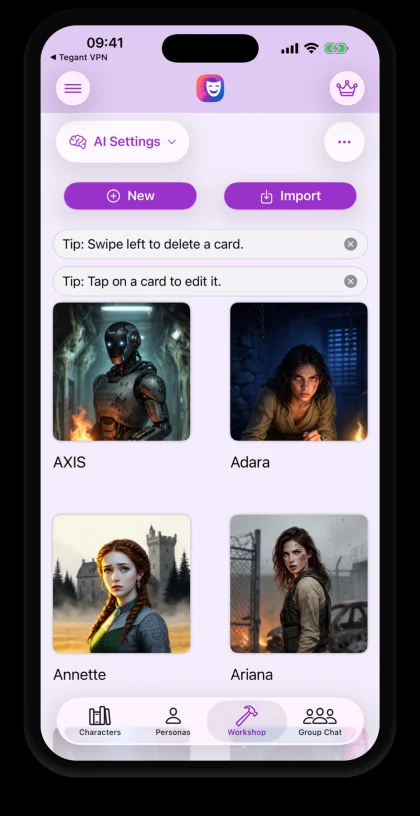
If you have a character card saved as JSON, tap Import instead. Our card import guide explains which fields come through. Character AI's own export isn't a character card, so expect an "Invalid JSON format" message if you try to import it. For a full walkthrough of writing a character, see create your own AI character.
How to delete your Character AI account
On the web, go to Profile, Profile Settings, Account, Manage Account & Data, then Delete Account. In the mobile app, open your Profile, find the settings icon and choose Remove Account. Character AI says deletion is permanent and can't be reversed.
If you also want your export, wait until you've downloaded it, because we found nothing saying a pending export survives deletion. If you pay through the App Store or Google Play, cancel there as well. The help page doesn't say that deleting your account ends the subscription.
Does deleting your account delete your chats?
Not necessarily everything. Character AI's Privacy Policy says it may keep information to meet legal obligations, resolve disputes and enforce its agreements. It also reserves the right to keep a character you made available to others active after you delete your account. Robbie Torney of Common Sense Media told KQED that exporting or deleting may not remove your data from model training.
Keep your own copies in the next app too
Any app can change hands or close, including ours. PersonaChat lets you export a conversation as a text file from its start or continue screen. It has no character export, so keep your own notes on the characters you build. Your chat history is stored on one device, with no cross-device sync.
If you'd like somewhere to carry on a story, PersonaChat is free to start, with a running recap, Living Memory and a Lorebook on every plan. Our comparison with Character AI says where each app is stronger.

Sources
- How do I download my data?, C.AI Help Center, read 2 November 2026
- How do I delete my account?, C.AI Help Center, read 2 November 2026
- Character.AI Privacy Policy, effective 1 July 2026
- CAI Tools features, CAI Tools Guide, read 2 November 2026
- Remixing and Definition Visibility, Character.AI Book, read 2 November 2026
- An Update on Character.ai, Character.AI, 12 October 2026
- Your Chatbot Just Went Bankrupt. What Happens Now to Your User Data?, KQED, updated 16 October 2026
Frequently asked questions
Can I export my Character AI chats?
Yes. Export Data in your account settings requests a copy of your account data. It is one request for the whole account, and Character AI says it can take 3 to 4 weeks. The emailed download link works for 7 days.
Can I export my Character AI characters or bots?
Not one at a time through Character AI. Its help page doesn't list what the account export contains. Third-party guides say it includes the characters you made, but reports differ on whether the full Definition comes through, so copy the details of your favorites by hand.
Can I export just one Character AI chat?
Character AI's help pages describe no way to export a single chat. You can copy and paste the messages into a document. The unofficial CAI Tools extension says it can download a single chat, but we haven't tested it.
Why hasn't my Character AI export arrived?
Character AI says exports can take 3 to 4 weeks. The link goes to the email on your account, so check that inbox and its spam folder. If the 7-day link has expired, request the export again. If you still have nothing, submit a request to Character AI's help center.
Can I transfer my Character AI chats to another account?
Character AI's help pages describe no way to load an export into another account.
Can I import my Character AI chats into PersonaChat?
No. PersonaChat has no chat history import and can't read Character AI's export file. You can keep the export as an archive and continue a story from a recap in a rebuilt character.
Can I import my Character AI characters into PersonaChat?
Not directly. Rebuild them in the Workshop by pasting in the details you saved. If a creator has also posted a character card as a JSON file, on Chub for example, PersonaChat can import that.
Will the export still work if Character AI closes?
We found nothing from the company on whether exports would keep working during a wind-down, which is a good reason to request yours early.
Does deleting my Character AI account delete my chats?
Not necessarily everything. Character AI says deletion is permanent, but its Privacy Policy says it may keep information to meet legal obligations, resolve disputes and enforce its agreements, and it reserves the right to keep a character you made available to others active.
Should I delete my account before the sale?
That's your decision. If you want a copy of your data, request the export and download it first, because Character AI says deletion is permanent and we found nothing saying a pending export survives it.